
In this tutorial, we will create a species of creatures that will randomly move within a canvas searching for food. It should look something like above when we finish!
File Structure
To make it easier to make changes in our game in the future it will help if we develop the game in more than just one file.

- creature.js will have a javascript class that has attributes we can assign to each of our creatures.
- evo.js will contain all our javascript logic.
- index.html will display the canvas.
index.html
First, we create a canvas so that we can draw on the screen.
The script tags are used to get our JavaScript files. We place these after <canvas> so that the canvas is ready when we run our JavaScript.
<canvas id="canvas" width="500px" height="500px">
<script src="./creature.js"></script>
<script src="./evo.js"></script>
creature.js
A class is a template for creating objects. Each creature object will be derived from the creature class. Every creature will have it’s own attributes that can be changed independently from the other creatures.
Each variable within a class is known as a field. The x and y fields will define the position of our creature. The xDirection, yDirection and directionAngle fields will define the direction in x and y that our creature will move.
class Creature {
    x = 0;
    y = 0;
    speed = 2;
    colour = 'green';

    // The direction we are travelling to
    xDirection = 0;
    yDirection = 0;
    directionAngle = 0;

    // How long we should go in a given direction
    directionIntvl = 0;

    radius = 4;
  }
evo.js
First we need to get our html canvas and it’s 2D context like we did with Pong.
let canvas = document.getElementById('canvas');
let ctx = canvas.getContext('2d');
Next we will use a for loop to create 20 creature objects using our creature class.
To create a new object, we simply use the new keyword.
We then set the creature’s position. Math.random() gives us a point between 0 and 1, so by multiplying it by the width and height of the canvas we get a random position within the canvas.
Move the creature eachFrame()
Next we pass the creature to eachFrame(), so that we can move and manipulate our creature every frame like we did with the ball and paddles in Pong.
for (let x = 0; x < 20; x++) {
  let creature = new Creature();
  creature.x = Math.round(Math.random() * canvas.width);
  creature.y = Math.round(Math.random() * canvas.height);
  eachFrame(creature);
}
In our eachFrame() function we will move the creature. First we clear the frame so that we don’t have a “trail” from the previous frame. Next we move the creature our speed in x and y. Finally we draw the creature and send our creature to the next frame.
function eachFrame(creature) {
    // Clear last frame
    ctx.clearRect(creature.x, creature.y, 4, 4);

    // Move in direction
    creature.x += creature.speed;
    creature.y += creature.speed;

    // Draw creature
    ctx.fillStyle = creature.colour;
    ctx.fillRect(creature.x, creature.y, 4, 4);

    window.requestAnimationFrame(() => eachFrame(creature));
}
It should look something like this:

Natural Movement
To make our creature move in all directions, we will create a new function. We want our creature to move naturally rather than back and forth and so will move each creature for a random interval within 90 ° of it’s current direction as so:
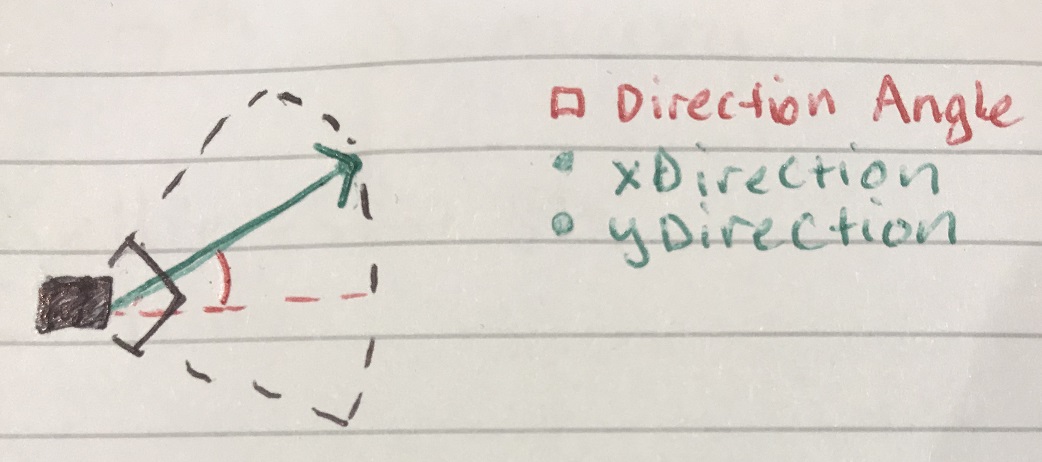
We will generate this direction and interval using genDirection().
// Generate new direction
function genDirection(creature) {
  // Calculate new angle 45 degrees either side of direction
  creature.directionAngle += (Math.random() - 0.5)*Math.PI / 2;

  // Calculate new direction at speed
  creature.xDirection = Math.cos(creature.directionAngle)*creature.speed;
  creature.yDirection = Math.sin(creature.directionAngle)*creature.speed;

  // Generate random interval up to 10 frames
  creature.directionIntvl = Math.random() * 10;
}
We then run genDirection() when our random interval reaches 0 by modifying our eachFrame() like so:
  // Generate new direction
  if (creature.directionIntvl <= 0) {
      genDirection(creature);
  } else {
      creature.directionIntvl--;
  }

  // Move in direction
  creature.x += Math.round(creature.xDirection);
  creature.y += Math.round(creature.yDirection);
  // creature.x += creature.speed;
  // creature.y += creature.speed;
}
Never leave the canvas
Finally we can make sure our creature never leaves the canvas with a rangeCheck().
// Check creature is within the canvas
function rangeCheck(creature) {

  if (creature.x < 0) {
    creature.x = canvas.width;
  } else if (creature.x > canvas.width) {
    creature.x = 0;
  }
  if (creature.y < 0) {
    creature.y = canvas.height;
  } else if (creature.y > canvas.height) {
    creature.y = 0;
  }
Make sure to run our creature through this function every frame.
// ...
creature.y += Math.round(creature.yDirection);
rangeCheck(creature);
// ...
That’s it! You can take a look at the result below:
 Ashbourne College Computing Club
Leave a comment